AdviGo multi-account messenger

Thousands of accounts.
In one window.

Conversations from all connected Telegram accounts arrive in one multi-account messenger. Your team replies from a shared workspace, without constantly switching accounts or sharing sessions.

Full version before payment. Account and team capacity depend on your chosen plan.

Thousands of accounts
in one interface
Private and group chats
without switching sessions
Team collaboration
with controlled access
Keep the conversation going, not the account search.

The entire flow in view.
Every client in context.

After outreach, replies should not be scattered across hundreds of sessions. Open the conversation, reply from its account and save the next step without leaving the multi-account messenger.

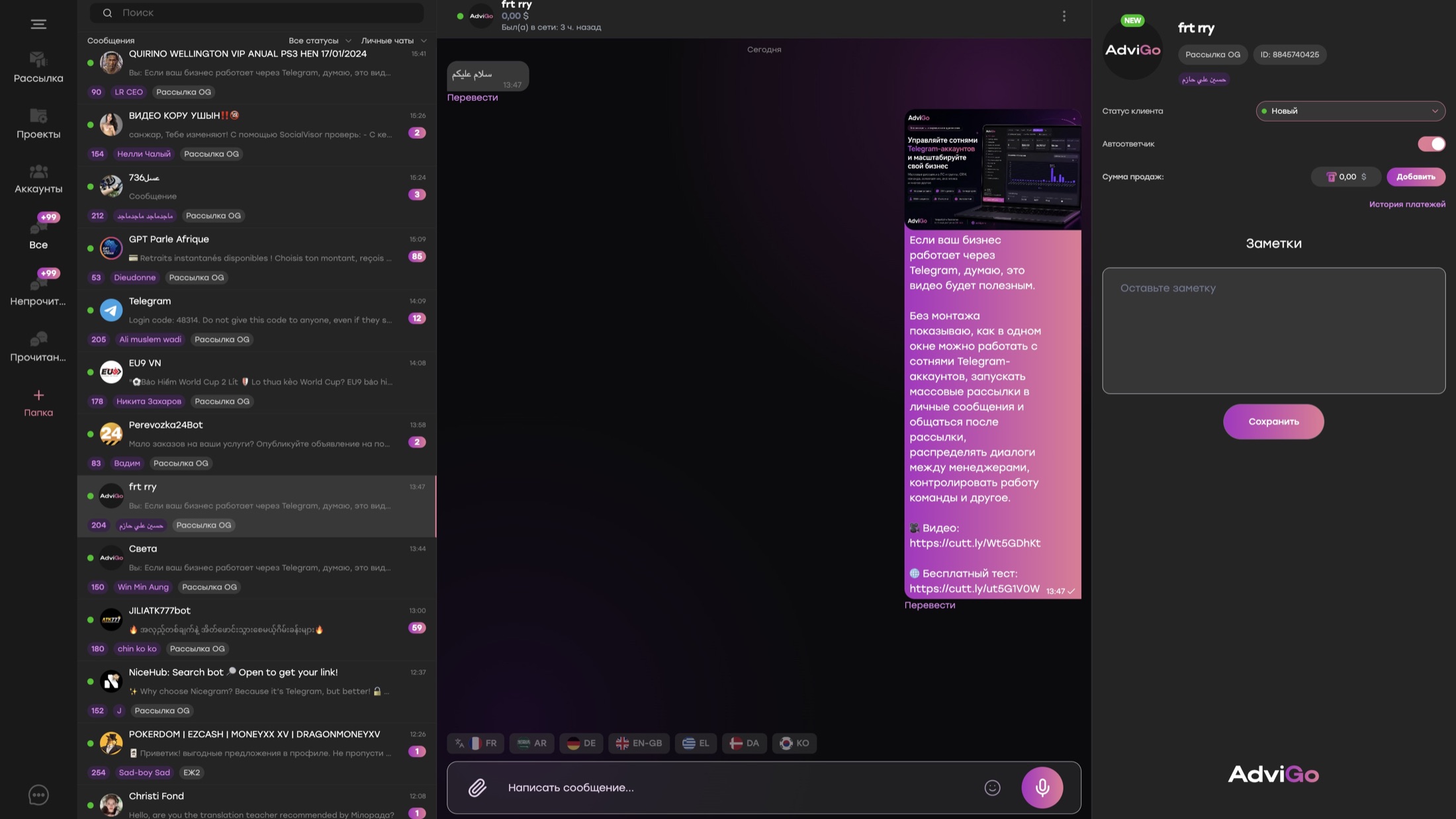
AdviGo multi-account messenger: all account conversations on the left, chat in the center, client statuses and notes on the right
01 / Shared conversation queue02 / Client conversation03 / Statuses, notes, sales
01

One incoming flow

Private and group conversations from connected accounts share one interface. Managers do not need to find which account received a reply.

02

Context beside the chat

Client status, notes and sales records sit alongside the conversation. No need to piece the history together from different services.

03

More than text

Attachments, reactions, voice messages, templates and auto-replies. For international conversations, translate with your own DeepL API key.

From the shared flow to a focused queue

Not every chat at once.
Just the ones you need.

Combine filters for the situation at hand. Choose projects, accounts, conversation types and client statuses, with names and stages tailored to your workflow.

01Read, no reply

The recipient has read your outgoing message, but no reply has arrived yet.

When to use it: Return to the conversation with a relevant follow-up instead of messaging your entire list again.

02Unread incoming

User messages that have not yet been read on your accounts.

When to use it: Gather incoming messages that need your team’s attention and start with that queue.

03Private and group chats

Separate selections for private conversations and group chats.

When to use it: Keep individual client work separate from group communication.

04Client statuses

Your workflow stages and custom status names.

When to use it: Choose clients at a specific stage to continue with a suitable offer.

05Accounts and projects

Conversations from selected Telegram accounts and business areas.

When to use it: Focus your team on the right project without mixing products and work accounts.

The same filters. Your next follow-up.

Found the right conversations?
Send outreach to that segment.

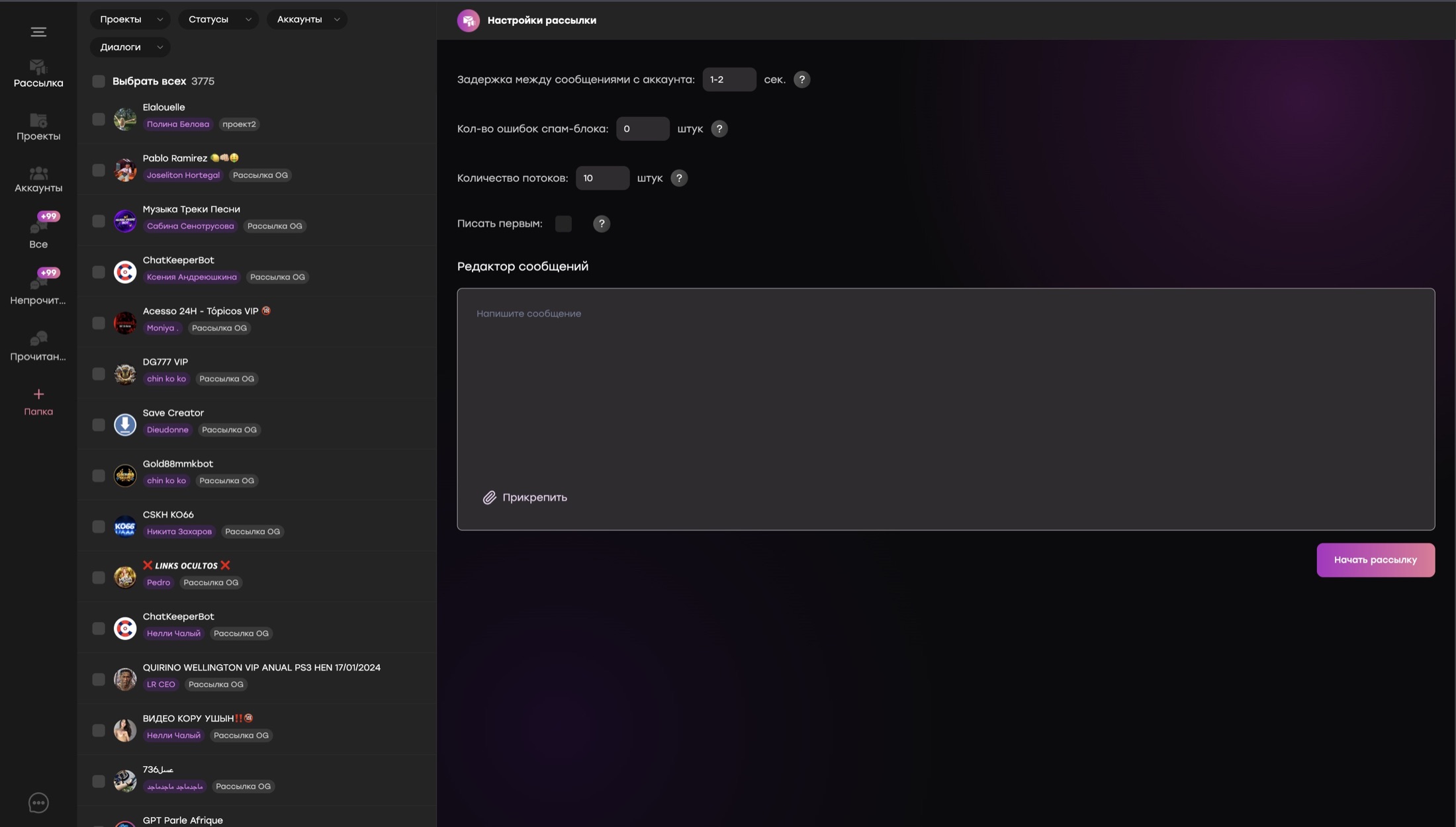
Outreach in open conversations is available directly in the multi-account messenger. Segment existing chats and send relevant messages without moving your list to another tool.

  1. Choose a segmentFor example, private conversations in a specific project where the client read a message but did not reply.
  2. Configure sendingPrepare a message for the selected audience and set your outreach parameters.
  3. Handle repliesContinue in the same window, update statuses and preserve client context.
AdviGo outreach in open conversations: project, status and account filters alongside the message editor
Test your own workflow
Your team grows. You stay in control.

Conversations for managers.
The business stays yours.

Delegate requests without sharing access to Telegram sessions themselves. Assign projects, limit data visibility and manage employee access from AdviGo.

No session sharing

Managers access conversations through AdviGo, not Telegram session files. Delegate communication while keeping control of your accounts.

Hide client usernames

Disable chat partners’ usernames for managers. The team can keep communicating, but client identifiers will not appear in their interface.

Disconnect access at any time

Control each employee’s access. If cooperation ends or concerns arise, disconnect the manager from the multi-account messenger immediately.

Payment detail checks

Unauthorized payment details —
a reason to disconnect access.

With checking enabled, the system disconnects a manager if it detects payment details other than the organization’s. Configure the check before delegating payment-related work to your team.

Enhanced security mode

Suspicious activity —
grounds for blocking access.

The system monitors User-Agent changes, which describe the browser and device, and blocks access when suspicious activity is detected, including signs of access being shared with another person.

From the first project to a large team

Connect your accounts.
Build your working system.

  1. Accounts and projectsConnect your working Telegram accounts and separate business areas.
  2. Team and securityGrant access and configure username visibility and security checks.
  3. Conversations and next stepsBuild a queue with filters, set statuses and start handling requests.
Before connecting your team

Important questions.

Can I connect thousands of Telegram accounts?

Yes. The multi-account messenger is designed to handle thousands of connected accounts in one window. Available account and user counts depend on your plan; discuss the scale you need with the AdviGo team before launch.

Do managers need Telegram session files?

No. Managers get access to the multi-account messenger and permitted projects, not Telegram session files. Employee access can be revoked at any time.

Can I hide client usernames from managers?

Yes. You can disable the display of chat partners’ usernames in settings. This limits access to client identifiers and reduces the risk of exporting your client base, but does not replace other data protection measures.

What happens if a manager sends unauthorized payment details?

With payment detail checks enabled, the system disconnects a manager if it detects payment details other than the organization’s. Configure this protection for your organization.

How does enhanced security mode work?

Enhanced mode monitors changes to the User-Agent, which describes the browser and device, and blocks access when suspicious activity is detected, including signs of access sharing. A User-Agent change alone does not prove access was shared: browser updates can also cause it.

How do read and unread conversation filters differ?

“Read, no reply” selects conversations where the recipient read your outgoing message but has not replied. “Unread incoming” selects conversations containing user messages that have not yet been read on your accounts.

Can I send outreach to filtered conversations?

Yes. The same filters are available for outreach in open conversations inside the multi-account messenger. Select a segment by project, accounts, statuses and conversation state, then configure sending.

Do I need to switch between Telegram accounts?

No. Connected private and group conversations are available in the AdviGo multi-account messenger.

Can several managers work at the same time?

Yes. Access permissions and projects let you share work among several employees and the owner.

Are media and voice messages supported?

Yes. The multi-account messenger supports text, attachments, reactions and voice messages.

Can I translate messages?

Yes. Choose the language beside the message field. Translation uses your connected DeepL API key.

Test with your own accounts

More conversations.
Not more open windows.

Connect accounts, test filters and invite a manager. The full version of AdviGo is available for 24 hours before payment.